Local AI Transparency for the Browser

The local visibility layer for the AI web.
100% on-device.

SafisAI scans modern pages locally for AI workflows, AI presence, image signals, and data privacy clues, then explains findings as OBSERVED, DISCLOSED, or POSSIBLE. No page upload. No SafisAI backend. We don't even own a server.

AI transparency should be visible and careful.

SafisAI is built around a simple question: is there any AI involved on this page? The extension favors evidence over hype, showing what was observed directly, what a site disclosed, and what is only possible.

4
Scan Buckets
3
Evidence Labels
0
Backend Calls
100%
Local Detection

AI transparency for every page your browser loads.

When a page is using AI, people should be able to understand how it shows up, whether it is disclosed clearly, and whether their data may be involved in that system.

01

How AI Is Used

If a page is using AI, SafisAI aims to show whether it appears as a workflow, assistant, generation layer, embedded tool, or other page-level signal.

02

Whether It Is Hidden

AI should not feel invisible by default. Some use is obvious, but disclosure and technical signals are not always visible without a closer look.

03

What It Means For Data

If AI features may touch prompts, text, images, or activity, users deserve clearer privacy context and careful evidence behind each claim.

Built for AI signals that hide in modern pages.

Many AI features do not announce themselves in plain text. SafisAI is designed to inspect page structure, embedded UI, and privacy signals without turning every hint into a certainty.

MODERN DOM

Modern Page Traversal

SafisAI looks beyond simple page text and inspects exposed page structure, including open Shadow DOM content where the browser makes it available.

PRIVACY

Prompt And Session Context

When AI workflows appear alongside analytics or session tooling, SafisAI can surface that privacy context so the page is not judged in isolation.

LOCAL

No Backend Detection

Scans run locally in the browser. SafisAI does not upload page contents to a server to decide whether AI is present.

Snapshot-based page scanning.

SafisAI performs local snapshot scans of page structure, workflow behavior, image signals, and privacy clues, then limits rescans to avoid stale or noisy results. Hidden tabs skip work, repeated identical findings are deduplicated, and results stay on-device. The cache automatically empties with a browser restart.
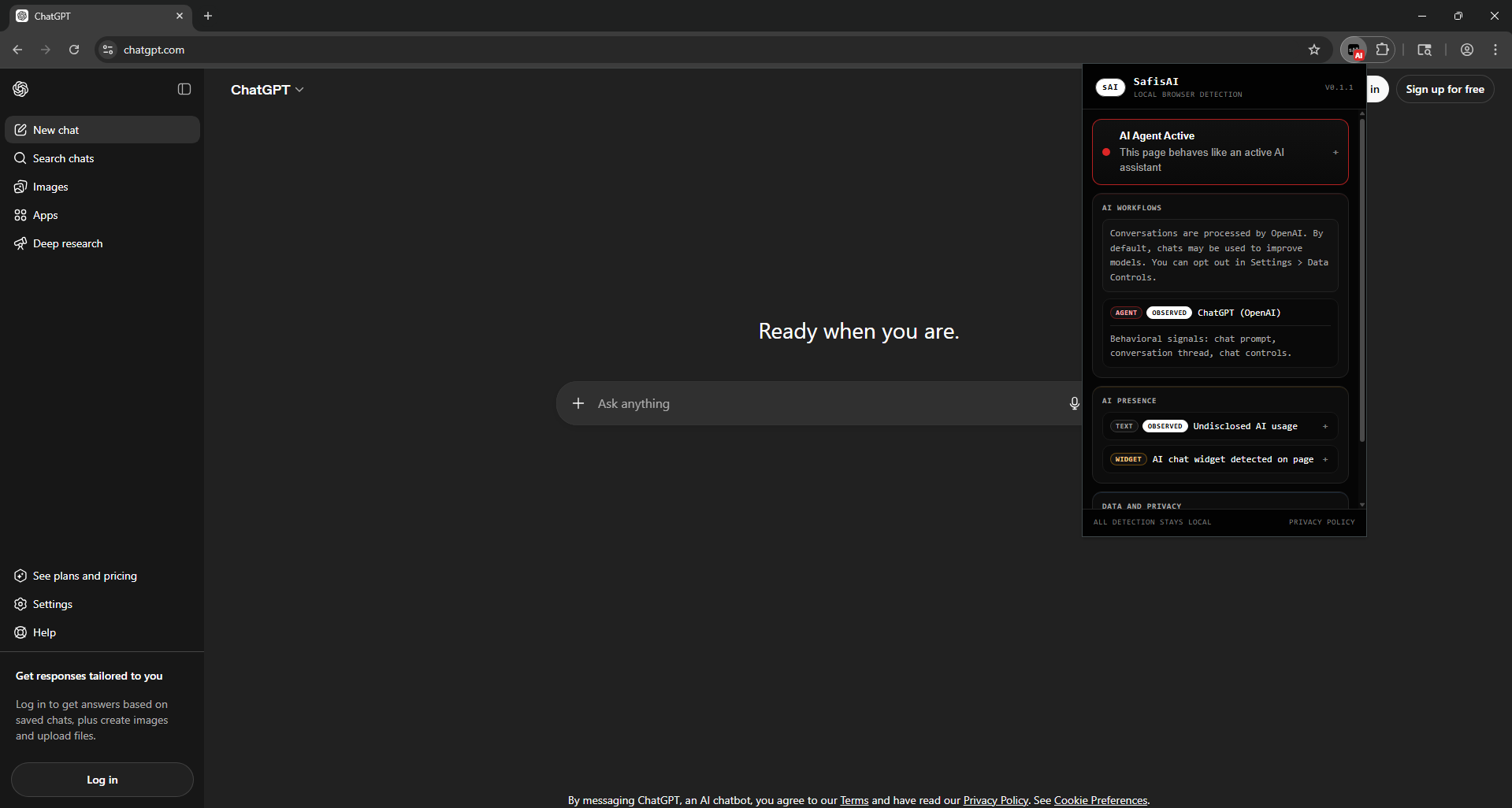
SafisAI popup showing workflow, presence, images, and privacy findings

Four buckets, one careful story.

Instead of one vague AI label, SafisAI breaks the page down into focused buckets so you can see what kind of evidence exists and how strong that evidence is.

01

AI Workflows

Flags when a page behaves like an AI tool or AI agent workflow. Known platforms help, but workflow behavior matters too.

02

AI Presence

Surfaces scripts, widgets, references, and page-level signals that suggest AI is present without overstating certainty.

03

AI Images

Checks AI-related image signals and provenance clues where available, while keeping wording conservative when proof is limited.

04

Data And Privacy

Separates privacy findings into OBSERVED, DISCLOSED, and POSSIBLE so direct technical evidence does not get mixed with softer inference.

How findings are worded.

SafisAI is designed to communicate what was actually found, not the strongest possible assumption.

$ safisai scan current-tab

Scanning local page snapshot...

WORKFLOW AI tool interface detected
PRESENCE OBSERVED - AI-related scripts or widgets found
IMAGES POSSIBLE - image signals suggest synthetic media
PRIVACY OBSERVED - analytics or session tooling present
PRIVACY DISCLOSED - site settings mention AI data controls

$ safisai status
Workflow type: AI tool or AI agent, when evidence supports it
Evidence labels: OBSERVED / DISCLOSED / POSSIBLE
SafisAI network use for detection: 0 external calls

SafisAI is live on the Chrome Web Store.

Install SafisAI directly from the Chrome Web Store.